
Master Your Pacing with the Right EMOM Timer App
An EMOM timer app is a tool for a specific type of high-intensity training: Every Minute on the Minute. It automates your workout with clear audio or haptic cues for each interval, so you can stop watching the clock and focus 100% on your form and effort.
For any serious athlete, it’s a non-negotiable piece of kit for building discipline and structure into your training.
What Is an EMOM Timer App and Why Does It Matter?
EMOM (Every Minute on the Minute) isn't a trend; it's a mental and physical discipline. An EMOM timer app is the tool that keeps you honest.
Training without a specific timer is like trying to bake by eyeballing ingredients. You might get something, but the results will be inconsistent. An EMOM app is a precision instrument, making sure every interval is exact, every rest is earned, and every ounce of effort is repeatable.
This structured approach removes the guesswork, turning raw effort into measurable gains. It’s about building your capacity to work under fatigue, whether you're a CrossFit athlete cycling a barbell or a boxer drilling combos against the clock.
The Problem with Generic Timers
The standard stopwatch on your phone doesn’t work for EMOMs. It forces you to be a clock-watcher, constantly breaking focus to see how much time is left. That mental distraction kills your rhythm and intensity, especially when you’re deep in a tough workout.
A dedicated emom timer app solves this by running the entire session for you. It acts as an impartial coach, counting you down and keeping you accountable to the second.
The growth of these specialized apps is no accident. It’s part of a larger shift toward smarter, structured training. The fitness app market is growing, with health and wellness app downloads expected to hit 3.6 billion globally in 2024. Within that, interval timers have carved out a critical niche because they are essential for high-intensity training. You can look at the fitness app market trends to see the data for yourself.
To understand the difference, let’s break down what your training looks like with and without the right tool.
EMOM Training At-a-Glance
This table shows the core components of EMOM training and why a dedicated app is superior to fumbling with a generic timer.
| Training Component | Without a Dedicated App | With an EMOM Timer App |
|---|---|---|
| Pacing & Focus | Constant clock-watching, distracting from form and breathing. | Full focus on the movement; the app handles the timing. |
| Rest Management | Guesswork. You must manually calculate rest time after each set. | Automatic. Rest time is whatever is left in the minute. No math required. |
| Consistency | Intervals can be inconsistent, leading to unreliable training data. | Perfectly consistent intervals, ensuring repeatable and trackable workouts. |
| Workout Flow | Stop-and-go. You have to reset the timer for each round. | Seamless flow. Set it once and it runs until the workout is done. |
| Accountability | Easy to cut reps or take a few extra seconds of rest. | The beep or vibration is non-negotiable. It holds you accountable. |
A dedicated app isn't a luxury—it's a fundamental tool for getting the most out of every session.
Who Benefits from an EMOM Structure?
While EMOMs are a staple in CrossFit boxes, the protocol is versatile. It’s a powerful framework for anyone looking to dial in pacing, boost conditioning, and practice skills under pressure.
- CrossFit Athletes: The most obvious group. EMOMs build consistency in Olympic lifts, gymnastics, and conditioning. They force a steady, repeatable pace from the first rep to the last.
- Combat Sports Athletes: Boxers, MMA fighters, and wrestlers can drill combinations or footwork, mimicking the work-to-rest ratio of a round.
- Endurance Athletes: Runners and cyclists can program intervals like 200m sprints or hill repeats on the minute. This builds speed endurance and trains the body to recover faster between hard efforts.
The principle is brutally simple: the clock dictates the pace. Finish your reps quickly, you earn more rest. Push too hard, too early, and you'll burn out. This built-in feedback loop teaches you to be smart about your output.
Ultimately, an EMOM timer app is about taking control of your training. It ensures every session is a deliberate step toward your goals, not just a random workout. It makes your effort count.
What to Look For in a High-Performance Timer
Not all timers are created equal. A basic stopwatch forces you to watch the clock, pulling attention away from what matters—your form, your breathing, your next rep. A true performance timer does the opposite. It fades into the background so you can lock in and focus on the work.
This isn't about gimmicks; it's about function. It's about a tool that holds up when you're fatigued and every second counts. Below are the non-negotiable features that separate a simple clock from a serious training partner.
Training tools can be viewed as a pyramid. A basic stopwatch is the foundation, but a structured EMOM timer app is what lets you build precise and effective workouts on top of it.
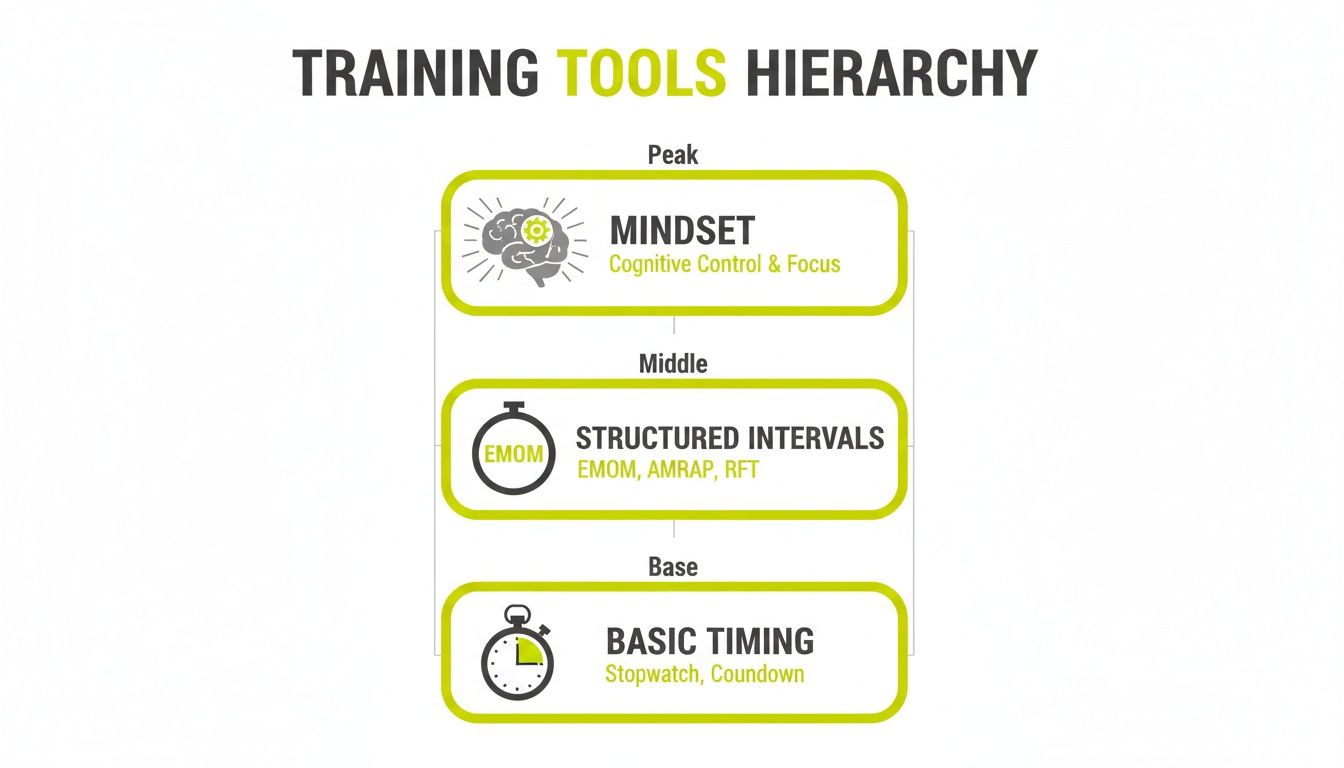
While simple timing is fundamental, a dedicated app provides the structure needed to hit peak performance.
Cues That Cut Through the Noise
In a loud gym with music blasting and weights dropping, a weak timer is useless. You need an app with cues that are impossible to miss, ensuring you hit every interval without a second thought.
- Loud, Distinct Audio: Look for sharp, clear beeps or voice countdowns that slice through ambient noise. Customizable sounds are a major plus, letting you pick one that grabs your attention.
- Strong Haptic Feedback: With headphones on, a powerful vibration from your phone or watch is a game-changer. It’s a physical tap on the shoulder that keeps you on pace without audio distraction.
These features make the timer work for you. You should never have to wonder, "Did I just miss the beep?"
Visuals Built for the Gym Floor
You won’t always have your phone propped up in front of you. A high-performance timer must be readable from a distance, even when vision is blurry with sweat.
The point is at-a-glance visibility. The display should convey critical info—time left, current round, work or rest—in a split second.
Look for a high-contrast display with large numbers. A clean, uncluttered interface is key. Landscape mode is a bonus, effectively turning your phone into a large gym clock, perfect for reading from across the room during a WOD or circuit.
Functionality That Respects Your Workflow
A great app should make your life easier, not add another task to your plate. The best timers are designed by people who train and understand what an athlete needs.
Here are the workflow features that matter:
- Saved Presets: No one wants to waste mental energy rebuilding their favorite EMOM or Tabata protocol every session. The ability to save and name your go-to workouts means you can start in seconds.
- Background Operation: Your timer has to run flawlessly in the background while you play music or use another app. A timer that dies when your screen locks is a dealbreaker.
- Precision and Versatility: Millisecond accuracy is a given. But a truly great app will also handle other protocols like AMRAP, Tabata, and simple rest timers. Our guide on finding the right HIIT timer app dives deeper into how this versatility supports a well-rounded training plan.
These core features are what make an EMOM timer app a reliable tool that supports your focus, pushes your intensity, and builds consistency.
EMOM Workouts for Different Types of Athletes
Knowing the theory is one thing, but application is where performance is built. The power of an EMOM timer app becomes clear when you see how it applies to specific training goals. This protocol's versatility is its strength. Think of it as a flexible framework you can tweak to build raw power, dial in skills, or hammer your aerobic capacity.
Let's look at what this means for different athletes. Below are templates you can plug into your training right now. Each is designed to hit a specific stimulus, showing how a precision timer translates into real-world performance.
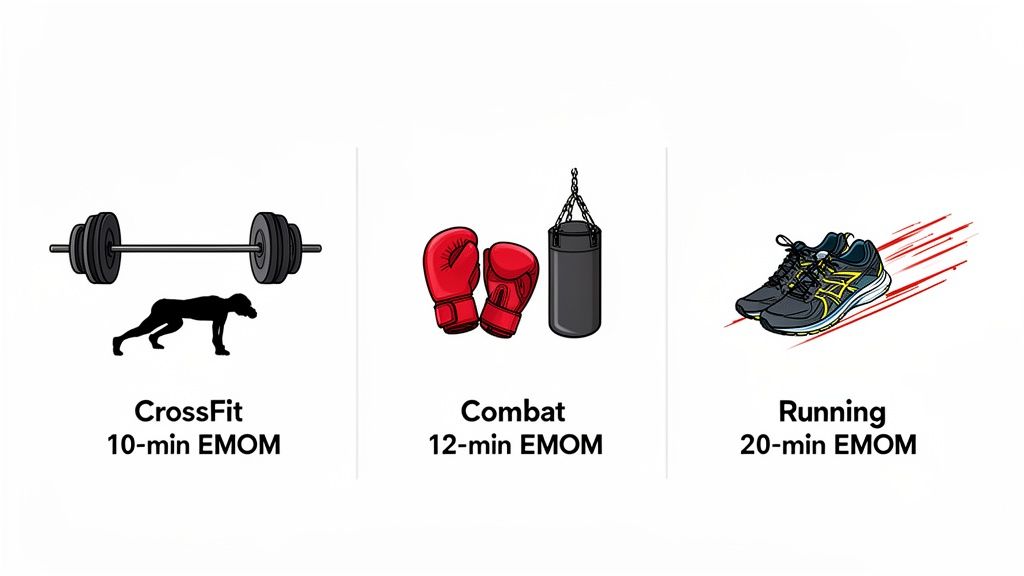
The demand for structured, second-by-second training is why specialized timer apps are a must-have. It's no surprise, considering the 3.6 billion health app downloads in 2024—a 6% jump from last year—as more athletes seek reliable tools. In the US alone, home to over 7,000 CrossFit affiliates, tools that can improve work capacity by 20-30% in benchmark WODs are indispensable. You can learn more about the growth of the fitness app market and see the scale of this trend.
For the CrossFit Athlete: Power Endurance
CrossFitters know EMOMs build consistency under fatigue. They force you to cycle a barbell or string together gymnastics reps with the same efficiency in minute ten as in minute one.
This workout builds power endurance and mental grit. The goal is to perform explosive work and then recover just enough to go again, teaching your body to buffer lactate and hold form when fatigued.
- Protocol: 10-Minute EMOM
- Movements: 3 Power Cleans + 5 Burpees Over Bar
- Intended Stimulus: The clock demands a high, steady power output. Aim to finish the work in 35-45 seconds, leaving just enough time to breathe and reset before the next beep.
- How to Scale: The rest period tells you everything. If you’re getting less than 15 seconds of rest, the intensity is too high. Scale back the reps (e.g., 2 cleans and 4 burpees) or reduce the weight. The goal is sustainability, not burning out in the first three minutes.
For the Combat Athlete: Skill and Conditioning
Boxers, MMA fighters, and martial artists need to maintain sharp technique and crisp footwork, even when gassed. An EMOM is the perfect way to drill skills under cardiovascular duress, mimicking the rhythm of a fight.
This protocol flips between offense and defense, sharpening skills while keeping the heart rate high. The short, intense bursts of work are a direct analog for combat.
This isn't just cardio; it's skill practice under pressure. The timer removes the need to think about pacing, letting you focus entirely on clean technique for every rep.
- Protocol: 12-Minute EMOM
- Odd Minutes (1, 3, 5, etc.): 20 seconds of heavy bag combos (e.g., Jab-Cross-Hook).
- Even Minutes (2, 4, 6, etc.): 30 seconds of agile footwork drills (e.g., cone weaves, lateral shuffles).
- Intended Stimulus: You’re building the ability to throw sharp, powerful combinations and then instantly switch to light, nimble footwork as fatigue sets in.
- How to Scale: Adjust the work duration. If your form gets sloppy, shorten the combo work to 15 seconds or the footwork to 25. The extra rest is the reward for maintaining quality movement.
For the Endurance Athlete: Aerobic Capacity
Runners, cyclists, and rowers can use EMOMs to build speed endurance and increase VO2 max. The structure forces you to hit a specific, challenging pace and then recover on the fly, training your aerobic engine to handle repeated hard efforts.
This running workout is a classic for a reason. It's designed to build top-end speed and teach your body to recover while still moving. It’s an interval session with a built-in accountability partner: the clock.
- Protocol: 20-Minute EMOM
- Movement: 200m Sprint
- Intended Stimulus: This pushes your aerobic threshold. The goal is to run each 200m interval at a consistent, tough pace—for example, hitting 40 seconds every time. The rest of the minute is your active recovery jog.
- How to Scale: Your rest is the feedback loop. If you’re getting less than 20-25 seconds of recovery, you’re going too hard. Shorten the distance to 150m. Conversely, if you have too much rest, pick up the pace on the next interval. A good emom timer app makes tracking these splits effortless.
Sample EMOM Workout Templates
To show how adaptable EMOMs are, here’s a quick-reference table with more ideas. Plug these into your routine or use them as a springboard for creating your own.
| Athlete Type | EMOM Protocol Example | Primary Training Goal |
|---|---|---|
| Weightlifter | 15-Min EMOM: 1 Snatch @ 85% of 1RM | Technical consistency with heavy loads |
| Gymnast | 8-Min EMOM: 3-5 Strict Muscle-Ups | Building raw strength and skill endurance |
| Hybrid Athlete | 24-Min EMOM: Min 1: 15-Cal Row, Min 2: 12 Burpees | Aerobic capacity and mental toughness |
| Swimmer | 16-Min EMOM: 50m Freestyle Sprint | Pacing, speed, and anaerobic threshold |
These are starting points. The real value of the EMOM format is that you can adjust reps, time, and movements to target exactly what you need to work on.
How to Customize Your Timer for Maximum Efficiency
A great tool should mold itself to you, not the other way around. When you dial in the settings on your EMOM timer app, it becomes an invisible coach, freeing you to focus 100% on your performance instead of fumbling with your phone.
A few minutes spent on setup pays off. You'll have less to think about, get into workouts faster, and feel more in sync with every session. The goal is to make the tech work for you, so you barely notice it's there.
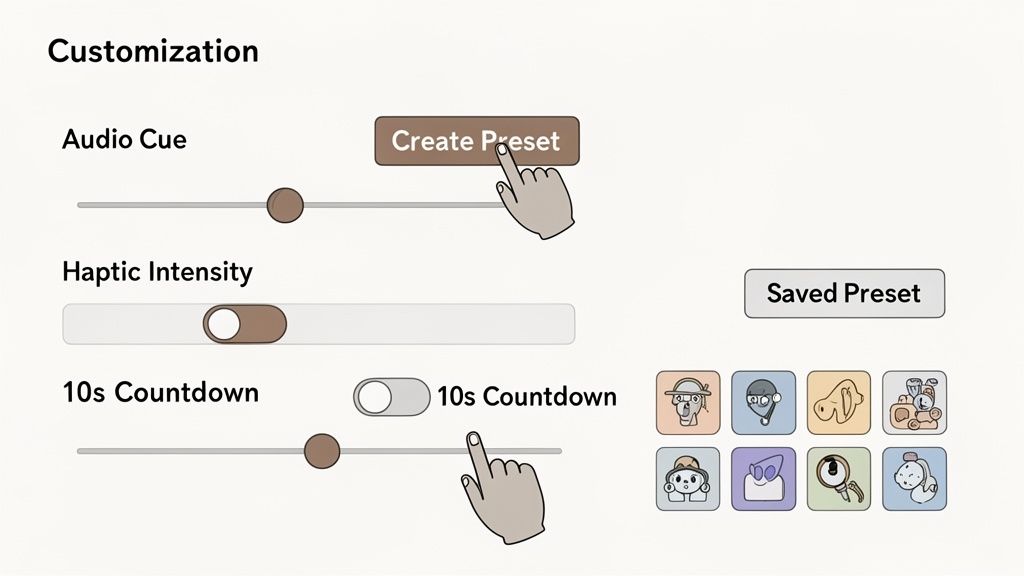
Dial In Your Cues
First, get the feedback right. Generic beeps don't always cut it. A top-tier timer lets you pick exactly how it gets your attention so you never miss a cue.
- Audio Cues: Experiment with different sounds. A sharp, loud beep might be perfect for a noisy gym, while a calmer chime could be better for a focused session at home. You want a sound that cuts through the noise without breaking your flow.
- Haptic Feedback: If you train with headphones, haptics are essential. A good app will let you adjust vibration intensity. Crank it up so you can feel it in your pocket or on your wrist—it's a clean, silent signal that it's time to go.
Create and Save Presets
This is the single biggest time-saver. Instead of building your workout from scratch every time, presets let you jump into your go-to routines with one tap. It eliminates pre-workout fiddling and saves mental energy.
Think of presets as your personal training playbook. "Tuesday Barbell Complex," "Thursday Sprints," or "Saturday Grinder"—naming and saving your workouts makes your plan efficient and easy to follow.
For instance, create a preset for a 10-minute EMOM complete with specific warm-up and cool-down timers. The app remembers everything. If you're looking for ideas on setting up different sessions, our guide on using a free interval timer app has you covered.
Pro Tips for a Seamless Setup
Once you have the basics down, a few small tweaks can make a big difference in your workout flow. These details separate a decent setup from a great one.
- Use a 10-Second Countdown: Always enable a pre-workout countdown. Those 10 seconds are crucial for getting into position, chalking up, or taking one final deep breath before the work begins.
- Activate Landscape Mode: For floor work like planks or push-ups, landscape mode is a lifesaver. It turns your screen into a large, bold gym clock that you can easily read from a distance.
- Adjust Auto-Lock Settings: Ensure your phone's screen won't go dark mid-workout. Nothing kills momentum faster than unlocking your phone between sets. A quality EMOM timer app like KNTC is built to override the auto-lock, keeping your timer visible so you can always see your progress.
Beyond EMOM: Why Your Timer Needs to Be Versatile
While EMOM is a fantastic protocol, a truly great timer app is more than that. Think of it as a training partner that adapts to any workout you throw at it. Your training isn't one-dimensional, so your timer shouldn't be either. A versatile emom timer app means you can stop juggling different tools and just focus on your performance.
It all comes down to efficiency. A boxer might use an EMOM for skill drills, then need a round timer for sparring—say, three-minute rounds with one minute of rest. An app that handles both without missing a beat removes friction. It becomes the one-stop shop for your entire training system.
One App for Every Workout
A high-performance timer should let you switch between different workout styles effortlessly. This isn't just for convenience; it's a must-have for any well-rounded athlete. Your timer needs to be as flexible as your training plan.
- AMRAP (As Many Rounds/Reps As Possible): Set a countdown and go. The app keeps the clock so you can focus on pushing your limits.
- Tabata: This classic high-intensity protocol—20 seconds of work, 10 seconds of rest—demands precise, rapid-fire cues that only a purpose-built timer can provide.
- Rounds for Time (RFT): Sometimes you just need a stopwatch. Hit start and see how fast you can complete a set piece of work.
- Simple Rest Timers: Program specific rest periods between heavy lifts to ensure full recovery for the next set.
This need for multi-functional timers is part of a major shift in digital fitness. The global market is projected to grow from USD 10.6 billion in 2024 to USD 33.58 billion by 2033. With 70% of fitness app users stating they prefer interval modes, it's clear that tools supporting multiple protocols are essential. You can dig deeper into the digital fitness ecosystem on Feed.fm.
The Advantage of a Single, Reliable App
Sticking with one app for everything makes training simpler. You get used to its cues, trust its accuracy, and can save all your go-to workout presets in one place. This creates a seamless experience from warm-up to cool-down, no matter what kind of training is on the schedule.
Your training week is varied, and your timer should support that. You might do an EMOM on Monday for skill work, a long AMRAP on Wednesday for conditioning, and timed sprints on Friday. A single, versatile app handles it all.
This is why apps like KNTC were built. They offer distinct, easy-to-use modes for EMOM, AMRAP, Tabata, and standard intervals, making the app a central hub for all timing needs. Choosing the best interval timer app means finding a tool that supports every facet of your training, not just one. It’s an investment in a system that grows with you.
Got Questions? We’ve Got Answers.
Here are some of the most common questions from athletes about EMOMs, with straight-to-the-point answers to help you train smarter.
Can I Just Use a Regular Stopwatch?
You can, but it's a massive handicap. Managing an EMOM with a standard stopwatch means you’re constantly clock-watching. You have to break focus, glance at your phone, and mentally calculate your rest time—all while your heart rate is redlining. That mental overhead is a performance killer.
A proper EMOM timer app handles all of that for you. It becomes an impartial coach, using loud, clear audio cues or strong vibrations to tell you when to work and when to rest. This lets you get in the zone and focus entirely on your form and effort. It’s the difference between guessing and knowing.
What's a Good Starting Workload for an EMOM?
The rule of thumb is to pick a weight or rep scheme you can finish in 30-40 seconds. This leaves 20-30 seconds of rest each minute. That rest period is your real-time feedback.
If you finish your reps in under 20 seconds, you’re likely going too light. If you’re left with less than 15 seconds to recover, the intensity is too high, and you're on a fast track to burnout. The goal of an EMOM is to find that sweet spot: a pace that is tough but repeatable, minute after minute.
You wouldn't sprint the first mile of a 5k. An EMOM teaches that same pacing discipline, forcing you to manage your energy so you can be just as strong in the last minute as you were in the first.
Does an EMOM Timer App Really Improve Performance?
Yes. The best training is structured and accountable, and that's exactly what an EMOM app provides. This training style is specifically designed to push your work capacity and teach you to perform under controlled fatigue. It builds physical grit and mental toughness.
When the beep goes off every 60 seconds, there’s no room for negotiation. You can't cheat the clock or sneak in extra rest. That unwavering accountability builds discipline and directly translates into measurable gains in conditioning, strength endurance, and pacing. It keeps your training honest, and honest training delivers results.
Ready to stop clock-watching and start training with purpose? The KNTC timer was designed for athletes who need reliability and zero distractions. Download it for free and feel the difference a pro-level timer makes.
Boxing Timer App: A Precision Tool for HIIT and Combat Training
Discover the boxing timer app that powers precise HIIT intervals, CrossFit rounds, and boxing workouts to boost performance.
HIIT Timer App: Your Guide to Precision-Driven Training
Discover the essential features of a hiit timer app to train with precision. Track intervals, stay on pace, and boost performance - click to learn more.